



Hit a 30s Timeout? Here’s How Lambda Function URLs Save the Day
“API Gateway times out after 30 seconds — even if your Lambda is still running.”
If you’ve ever hit that wall while building an API in AWS, you’re not alone.
But in 2022, AWS quietly released a feature that changes the game — Lambda Function URLs.
They give your function a direct HTTPS endpoint — with no API Gateway, no 30-second timeout, and no extra setup.
In this article, we’ll see why this matters, explore when to use Function URLs over API Gateway, and build a working example — deployed directly via AWS SAM.
The Problem: API Gateway’s 30-Second Timeout
When you expose a Lambda function through API Gateway, you inherit its timeout limit: Maximum: 29–30 seconds.
Even if your Lambda needs a few seconds more — API Gateway disconnects.
Your function still runs in the background, but the client gets a 504 Gateway Timeout.
This is painful when:
You’re generating long reports or PDFs
Doing ML inference or ETL workloads
Running large database queries
Doing batch job triggers that take >30s
You can’t easily stream intermediate results or extend the timeout — API Gateway simply caps it.
The Fix: Lambda Function URLs
Lambda Function URLs remove that cap.
They connect directly to your Lambda with:
No API Gateway in between
Full 15-minute timeout window (the Lambda max)
HTTPS endpoint automatically created
Built-in IAM or public access
Optional CORS configuration
Basically — fewer moving parts, fewer bills, and a lot more freedom.
You can invoke it via any HTTP client — browser, curl, Python, Postman — and it’ll stay alive as long as your Lambda runs (up to 15 minutes).
Behind the Scenes — How Function URLs Work
Under the hood, Function URLs use the Lambda HTTPS front-end service, the same infrastructure AWS uses internally when you invoke Lambda via the AWS Console or SDKs.
When you create a Function URL:
AWS provisions a secure HTTPS endpoint bound to that function’s ARN.
Every request is signed and routed directly to the Lambda service, skipping API Gateway’s routing layer.
The connection remains open until Lambda completes or times out (15 min).
This direct invocation path reduces latency, simplifies architecture, and eliminates the 30-second choke point entirely.
In performance tests, cold starts are identical to regular Lambda invocations. For compute-heavy workloads, skipping API Gateway can save 50–100 ms of overhead per request.
When should you use and when not to use Lambda Function URLs?
Ideal Scenarios
— Long-running compute (reports, ML inference, data transformation)- No 30s timeout
— Quick proof-of-concepts
— Event processing / asynchronous triggers
Not Ideal For
— Complex routing or versioning
— Multi-endpoint APIs
— Public APIs needing detailed access control
Building a Simple POC — Deploying via AWS SAM
Let’s create a small report-generation Lambda that simulates a long-running task (10 seconds), and deploy it directly with a Function URL.
Project Structure
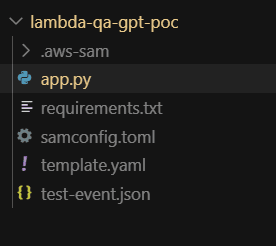
2. app.py
3. template.yaml
4. requirements.txt
5. Deploy via SAM CLI
During deploy, SAM will:
Create the Lambda function
Automatically provision a Function URL
Print the URL at the end
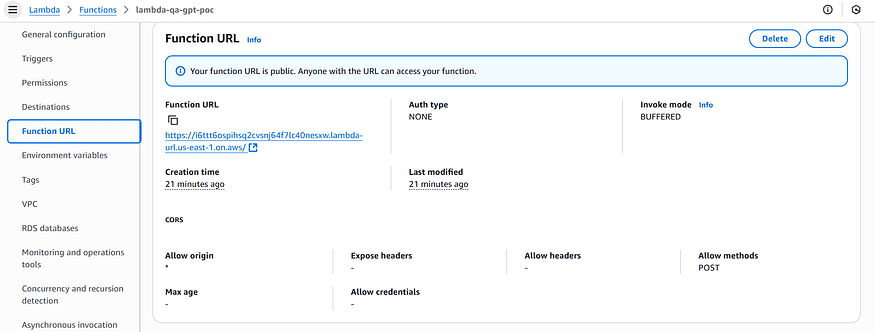
once deployed you can check it in the console you will get the function url there or you can print it in the template itself.
Authentication Gotcha
When
AuthType: NONE, anyone can hit the endpoint — including bots and crawlers.Use
AuthType: AWS_IAMor implement custom auth logic in the function itself .
Custom Domains Support (As of 2025)
You still can’t attach a custom domain directly to a Function URL.
The workaround: use CloudFront → Function URL origin, and attach your SSL cert to CloudFront.
This setup also adds caching and rate limiting — making it production-friendly.
Security & Best Practices
Even though Function URLs can be public, don’t leave them open unless you need to.
Use
AuthType: AWS_IAMfor internal or authenticated access.Add CORS properly if you expect browser clients.
For public endpoints, protect them behind CloudFront + WAF to block abuse.
Consider adding an API key or signed query param check inside Lambda.
Monitor usage via CloudWatch Logs and Lambda metrics.
Also, set Timeouts and Memory thoughtfully — long-running doesn’t mean infinite!
If your task regularly exceeds 5–10 minutes, it might be better suited for Step Functions or Fargate.
Key Takeaways
API Gateway = Feature-rich API management, but limited to 30s per request.
Lambda Function URLs = Lightweight HTTPS endpoints with 15-minute limit and zero overhead.
Perfect for long-running, compute-heavy, or internal API use cases.
Can be deployed instantly with AWS SAM — no extra services needed.
Think of Function URLs as “serverless endpoints without the ceremony.”
They don’t replace API Gateway — but for certain workloads, they absolutely outperform it.
Conclusion
Function URLs are not just a simpler API entrypoint — they’re a cost-effective, timeout-free, direct compute surface for specific workloads.
Use them when you need long-running tasks, simplicity, or private internal tools — but wrap them carefully if you expect scale or public traffic.