



High-Level Design: A Comprehensive Deep Dive
When building any software system, jumping straight into coding is tempting. But without a blueprint, teams virtually guarantee confusion, costly rework, and significant delays. That’s where High-Level Design (HLD) comes in.
Think of HLD as the architect’s drawing for your software. It doesn’t show every screw and nail, but it clearly defines the structure, flow, and critical choices that make the system stable, scalable, and secure.
In this comprehensive guide, we’ll break down the core components of an HLD, explore deep technical concepts, and illustrate them with creative real-world examples that bring theory to life.
Core Components of an HLD
1. Introduction & Objectives
Every HLD starts with a clear purpose, what problem the system solves and why it matters. This sets the context for all design choices.
The Problem Statement Framework
A solid objective follows the SMART principle (Specific, Measurable, Achievable, Relevant, Time-bound) and should outline:
Current State: What exists today and why it’s insufficient
Desired State: What success looks like
Success Metrics: Quantifiable KPIs (e.g., response time, cost, uptime)
Constraints: Budget, timeline, skills, or compliance limits
Example: Concert Ticket Marketplace
Problem: Concert-goers struggle with ticket scalping, fake tickets, and unfair pricing. Existing platforms charge 15–20% fees and have frequent outages during high-demand sales.
Objective: Build a blockchain-verified ticketing platform that:
Reduces fees to under 5% through serverless architecture
Handles 100,000 concurrent users during ticket drops
Prevents ticket fraud through NFT-based verification
Provides sub-200ms response times globally
Achieves 99.99% uptime during peak events
AWS Approach: If the objective is a cost-efficient, scalable backend, AWS Lambda (serverless compute) can be chosen as the core execution engine, with DynamoDB for persistent storage and S3 for ticket metadata/images.
2. Architecture Overview
At the heart of an HLD is the big-picture diagram. It should illustrate:
Core services (frontend, backend, database)
APIs and external integrations
Deployment environments
This view gives stakeholders a quick understanding of how everything fits together.
Architectural Patterns
Different systems call for different approaches:
Monolithic: One deployable unit — simple, fast for MVPs.
Microservices: Independent services with separate databases — ideal for scaling and clear domain boundaries.
Serverless: Event-driven, auto-scaling, and pay-per-use, perfect for modern, lean systems.
Layered Architecture
Presentation Layer: UI and user interactions
Application Layer: Business logic and orchestration
Domain Layer: Core entities and rules
Data Layer: Databases, caches, queues
Example: Concert Ticket Marketplace
Flow Overview:
Key Design Choices:
Event-Driven: EventBridge decouples services for resilience
CQRS: DynamoDB for writes, OpenSearch for fast reads
Real-Time Updates: WebSockets for live seat availability
Global Scale: Route53 + CloudFront enable multi-region, low-latency performance
AWS Stack: A typical architecture might be API Gateway → Lambda → DynamoDB, with static assets in S3 + CloudFront, and monitoring through CloudWatch.
3. Functional Components
Break the system into major modules, for example:
Authentication service
Payment gateway integration
Notification and messaging service
Each should describe what it does, not how it’s coded.
Aligning with Domain-Driven Design (DDD)
Functional components should follow business domains, not technical layers:
Ubiquitous Language: Shared vocabulary between devs and business
Aggregate Roots: Entities that enforce consistency
Domain Events: Signals for cross-context actions
Example: Concert Marketplace Domains
Identity & Access: MFA, OAuth2, RBAC, JWT session management
Inventory Management: Seat mapping, real-time availability, presale/lottery strategies
Transaction Processing: Payment orchestration, PCI-compliant tokenization, fraud detection
Fulfillment & Verification: NFT minting, QR codes, resale marketplace, gate scanning
Fan Engagement: Personalized recommendations, waitlists, social sharing, loyalty rewards
AWS Implementation
Identity: Amazon Cognito user pools with Lambda triggers for custom logic
Inventory: DynamoDB with conditional writes for atomicity, ElastiCache for read-heavy queries
Transaction: Step Functions for saga pattern orchestration, SQS for asynchronous processing
Fulfillment: Lambda + Web3.js for blockchain interaction, S3 for ticket PDFs
Engagement: Pinpoint for marketing campaigns, Personalize for ML recommendations
4. Data Flow & Interactions
Show how information moves through the system. Sequence diagrams or Data Flow Diagrams (DFDs) work best here, especially for key use cases like login, checkout, or API requests.
Key Insights from Sequence Diagrams
Synchronous vs. Asynchronous communication patterns
Failure points and retry strategies
Latency contributors in the critical path
Idempotency requirements for safe retries
Example: High-Demand Ticket Drop
Flow:
Steps:
User clicks “Buy Tickets” (50K concurrent requests)
CloudFront serves cached availability
API Gateway rate-limits requests
Auth Lambda validates JWT
Queue Lambda writes to SQS FIFO (prevents double-booking)
Worker Lambda conditionally writes to DynamoDB, holds seat, publishes to EventBridge
EventBridge triggers: Email, WebSocket, Analytics
Payment Lambda processes payment, updates DynamoDB, queues NFT minting
Timeout Lambda releases expired holds
Failure Handling:
Lambda timeout: SQS visibility timeout > Lambda timeout (65 seconds vs 60 seconds)
DynamoDB throttling: Exponential backoff with jitter, on-demand capacity mode
Payment provider downtime: Circuit breaker pattern (fail fast after 3 failures)
Duplicate requests: SQS FIFO deduplication + DynamoDB conditional writes
AWS Example: A checkout flow may look like API Gateway receives request → Lambda validates → DynamoDB writes order → SNS triggers fulfillment → S3 stores invoice.
5. Technology Stack
Document your chosen stack, frameworks, databases, cloud services and explain the rationale for each selection. This ensures consensus and prevents costly technology drift later on.
Performance: Throughput, latency, resource efficiency
Scalability: Horizontal/vertical scaling, stateless vs. stateful
Cost: Compute, data transfer, managed service premiums
Developer Experience: Team expertise, local dev, testing/debugging
Operational Overhead: Maintenance, monitoring, disaster recovery
Example: Concert Marketplace Stack
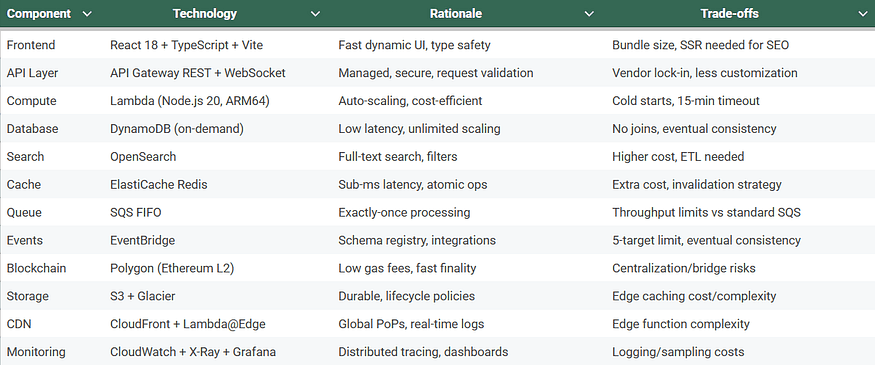
Alternatives Considered:
Containerized Microservices
ECS Fargate + ALB + RDS Aurora + ElastiCache + Kafka
Pros: More control, easier local dev, complex transactions
Cons: Higher baseline costs (~$500/month), slower scaling, patching burden
Edge-First Architecture
Cloudflare Workers + Durable Objects + R2 + D1 SQLite
Pros: Lowest latency (0–50ms), simplified stack, cheaper egress
Cons: Platform immaturity, smaller ecosystem, vendor lock-in
AWS Example: Tech stack could be Node.js on AWS Lambda, DynamoDB for database, API Gateway for API layer, and S3 for file storage.
6. Non-Functional Requirements (NFRs)
Beyond features (what the system does), NFRs define the system’s quality attributes (how well it performs and runs). Include:
Performance: API latency under 200 ms
Scalability: auto-scaling policies
Availability: 99.9% uptime
Security: encryption, RBAC, compliance (GDPR, HIPAA, PCI)
Maintainability & Extensibility
Key Metrics (SLIs, SLOs, SLAs)
SLIs: Request latency, error rate, throughput, uptime
SLOs: e.g., 99% of API requests <200ms, 99.9% uptime, <0.1% error rate
SLAs: Contractual guarantees, e.g., 99.5% uptime or service credits, regulatory data retention
Example: Concert Marketplace
Performance:
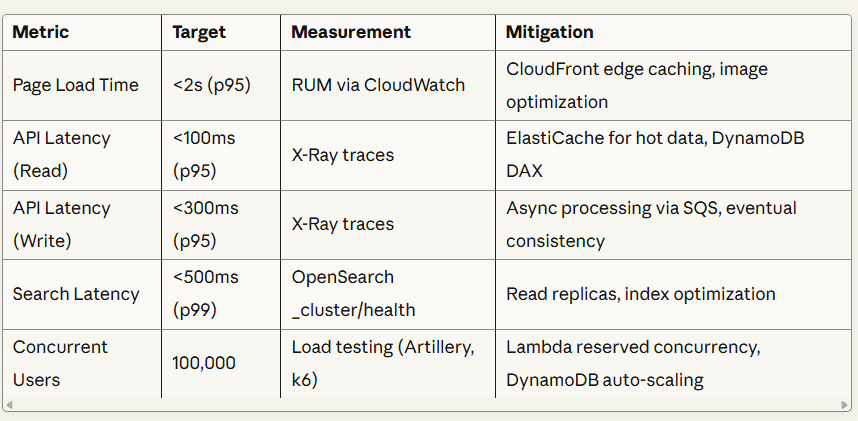
Scalability & Availability:
Vertical Scaling: Not applicable (serverless)
Horizontal Scaling:
Lambda: 1,000 concurrent executions per region (can request increase to 10,000+)
DynamoDB: On-demand capacity mode (auto-scales without limits)
API Gateway: 10,000 requests/second per region (soft limit, can increase)
CloudFront: Unlimited (petabyte-scale proven)
Auto-Scaling Policies:
Availability & Resilience
Multi-AZ & multi-region active-active deployments
RTO <15 min, RPO <1 min, automated backups to S3 Glacier
Chaos testing monthly
Security:
OAuth2/OIDC + MFA, JWT tokens, RBAC, rate-limited API keys
Encryption at rest (AES-256) & in transit (TLS 1.3), KMS key rotation, Secrets Manager
Compliance: PCI-DSS, GDPR, CCPA, SOC 2 Type II
Network security: WAF, Shield, VPC private subnets
Vulnerability management: Snyk, penetration tests, bug bounty
Maintainability & Extensibility:
80% test coverage, ESLint + Prettier, JSDoc/OpenAPI
Blue-green & canary deployments, feature flags, rollback <5 min
Extensible via EventBridge, API versioning, webhooks
AWS Example: Lambda provides horizontal scaling, DynamoDB has auto-scaling throughput, CloudWatch monitors latency, and KMS ensures encryption.
7. Infrastructure & Deployment
A snapshot of how the system runs in production:
Cloud/on-prem deployment strategy
CI/CD pipeline overview
Backup and disaster recovery plans
Infrastructure as Code (IaC)
Version-controlled, peer-reviewed infrastructure using tools like:
IaC Tools Comparison:
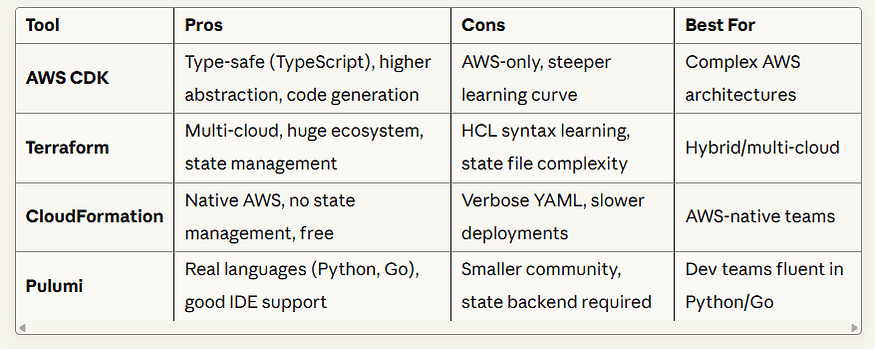
CI/CD Pipeline (Concert Marketplace Example)
Feature branch → local dev with LocalStack → unit & integration tests
Build & Test: ESLint/Prettier, Jest coverage, Lambda/Docker artifacts
Security Scan: Snyk, Checkov, secrets detection, SAST
Deploy to Dev: CDK synth/diff/deploy, smoke tests
Integration Tests: API contracts, load testing, security/performance checks
Manual Approval → Deploy to Production: Blue-green & canary releases, DB migrations, automated rollback
Post-Deployment: Monitoring, chaos engineering, performance baselines, notifications
Deployment Strategies
Blue-Green:
Canary:
Disaster Recovery
Region Failure: Route53 health check → failover to secondary region, DynamoDB Global Tables
DB Corruption: Point-in-time recovery (<15 min)
DDoS Attack: WAF + Shield Advanced, CloudFront rate limiting
AWS Example: Deploy using AWS CDK or Terraform, CI/CD with CodePipeline + CodeBuild, disaster recovery with DynamoDB global tables and S3 cross-region replication.
8. Data Design
Provide a high-level schema or entity-relationship diagram. Keep it simple, showing key tables/collections and relationships.
NoSQL Principles (DynamoDB)
Single-Table Design: Multiple entity types in one table, composite keys (PK/SK), GSIs for alternate queries
Access Pattern First: List query patterns before designing schema; optimize for read-heavy workloads; accept eventual consistency for non-critical reads
Example: Concert Marketplace
DynamoDB Main Table: TicketMarketplace
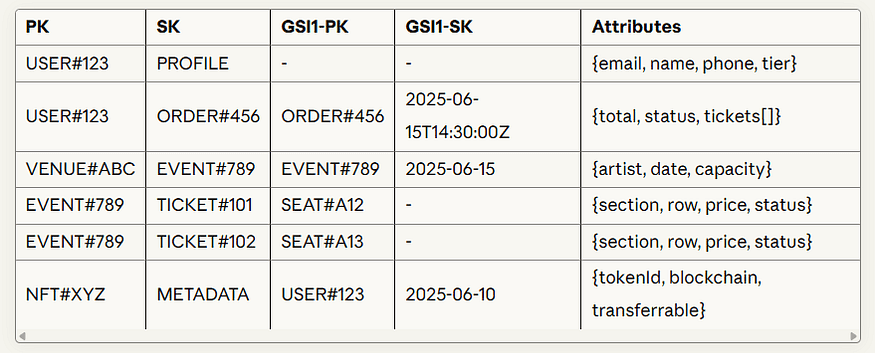
Access Patterns:
OpenSearch Index: ticket-search
Consistency Strategy:
Strong: Authentication, payment, ticket purchase
Eventual: Profile reads, order history, event metadata
Cross-service: DynamoDB → OpenSearch via Streams + Lambda (1–5s lag)
Data Retention & Archival:
Active: Current events/tickets in DynamoDB, recent orders (<90 days)
Archived: Completed orders (>90 days) & analytics in S3/Glacier, audit logs (7 years)
AWS Example: DynamoDB tables designed with partition key + sort key, GSIs for alternate queries, and S3 buckets for object-based storage.
9. Observability & Monitoring
Outline how the system’s health will be tracked:
Metrics, logs, and traces
Alerts and thresholds
Tools like Prometheus, Grafana, or ELK stack
Three Pillars of Observability
Metrics: System (CPU, memory), Application (request rate, errors), Business (tickets sold, revenue)
Logs: Structured JSON logs with correlation IDs, levels (ERROR, WARN, INFO, DEBUG), centralized aggregation
Traces: Distributed tracing to track requests across services, identify slow components, and propagate errors
Example: Concert Marketplace
Metrics Pipeline:
Key Metrics Dashboard:
Golden Signals: Latency (p50/p95/p99), Traffic (RPS), Errors (4xx/5xx), Saturation (throttles, capacity)
Custom Business Metrics:
Logging:
Log Retention Policy:
ERROR logs: 90 days in CloudWatch, indefinite in S3
INFO logs: 7 days in CloudWatch, 30 days in S3
DEBUG logs: 1 day in CloudWatch, not stored
Distributed Tracing: X-Ray visualizes end-to-end flow, highlights slow segments (e.g., OpenSearch 46% of total time), propagates trace IDs downstream
Alerting:
P1: Critical, immediate pager (API error rate >1%, payment down)
P2: High, notify within 15 min (API latency p99 >1s, Lambda throttles)
P3/P4: Medium/Low, less urgent or daily review
Synthetic Monitoring: CloudWatch Synthetics runs periodic checks on endpoints (homepage, search, login)
Dashboards:
Executive: Tickets sold, revenue, conversion, CSAT
Operations: Service map, error rate, Lambda concurrency, DynamoDB throttles
Security: Failed logins, WAF blocks, certificate expiry
AWS Example: Use CloudWatch Logs/Metrics, X-Ray for tracing, and dashboards in CloudWatch or Grafana with Amazon Managed Grafana.
10. Assumptions, Constraints, and Risks
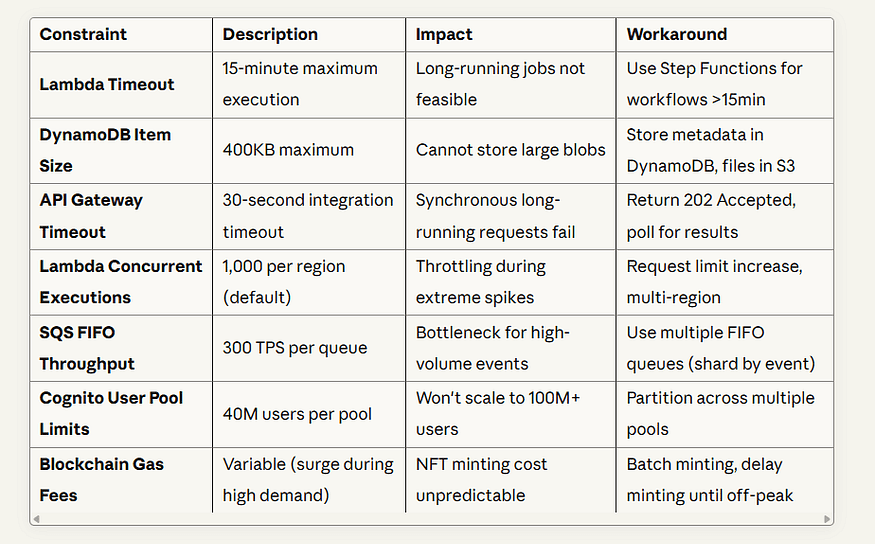
Be upfront about assumptions (e.g., “API supports 1000 RPS”), constraints (legacy dependencies), and critical risks (vendor lock-in, scaling issues). Highlight mitigation strategies — this turns the document into a proactive risk-management tool.
Risk Assessment and Mitigation
Use a risk matrix to prioritize issues:
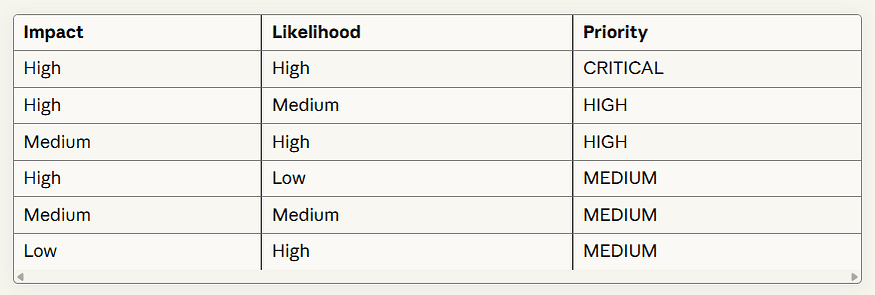
Key Assumptions
Traffic: Avg 10k active users, peak 100k concurrent, burst 10× in 5 min
User Behavior: 70% mobile, avg session 8 min, 60% cart abandonment
Data Volume: 10k events/year, 1M tickets/year, 500k transactions/year
Third-Party Services: Stripe uptime 99.9%, Polygon 2s finality, SES 99.9%
Cost Assumptions: Lambda 200ms/512MB, DynamoDB 1M reads/500k writes/day, S3 10TB
Constraints
Critical Risks & Mitigation
Scalability Bottleneck (Probability: MEDIUM, Impact: HIGH)
Warm Lambdas, virtual waiting room, load testing, circuit breakers, graceful degradation
2. Payment Fraud (Probability: HIGH, Impact: HIGH)
CAPTCHA, device fingerprinting, ML fraud detection, 3D Secure, manual review queue
3. Vendor Lock-In (Probability: HIGH, Impact: MEDIUM)
Abstraction layers, portable data formats, standard APIs, quarterly multi-cloud pilots
4. Data Breach (Probability: LOW, Impact: CRITICAL)
Zero Trust, least privilege IAM, Secrets Manager, encryption, WAF, pretesting, bug bounty
5. Third-Party Service Outage (Probability: MEDIUM, Impact: HIGH)
Health checks, circuit breakers, fallback storage, multi-provider setup, status updates
6. Regulatory Compliance Failure (Probability: LOW, Impact: CRITICAL)
Privacy by design, automated DSARs, contracts with processors, audits, compliance dashboards
7. Blockchain Smart Contract Vulnerability (Probability: LOW, Impact: HIGH)
Audited contracts, external review, formal verification, proxy upgrade pattern, circuit breaker, gradual rollout
AWS Example: Assume DynamoDB can scale to required RPS, constraint is vendor lock-in with AWS services, and risk is Lambda cold start (mitigated with Provisioned Concurrency).
Best Practices for Writing an HLD
1. Keep It Simple & Visual
Principle: A diagram is worth a thousand words. Use clear, standardized notations that stakeholders can understand at a glance.
Use clear diagrams: C4, UML, Mermaid, Draw.io, Excalidraw
Avoid dense paragraphs, overly complex diagrams, inconsistent notation, missing legends
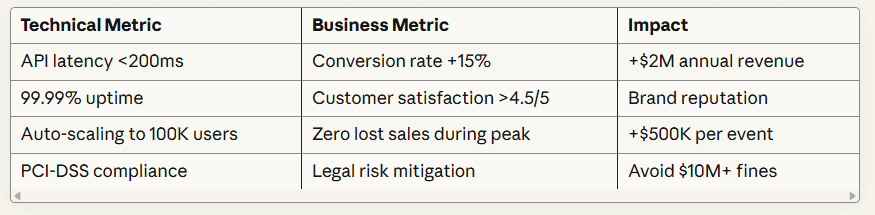
2. Align with Business Goals
Principle: Every technical decision should trace back to a business objective. This ensures engineering efforts deliver value, not just complexity.
Framework: Use the “5 Whys” technique
Decision: Use DynamoDB instead of RDS
Why? Need millisecond latency for ticket availability checks
Why? Users abandon if page loads >2 seconds
Why? Every 100ms delay reduces conversions by 7%
Why? Revenue directly tied to conversion rate
Business Goal: Maximize ticket sales revenue
Metrics Alignment:
3. Use Standard Notations
Principle: Consistent, industry-standard notations make HLDs accessible to new team members and external partners.
Architecture: AWS/Azure/GCP icons, C4
Data Models: Chen/Crow’s Foot, UML Class Diagrams
Sequence Diagrams: UML, show actors, messages, activation boxes
4. Define Clear Boundaries
Principle: Explicitly show what’s inside vs. outside your system’s control. This clarifies responsibilities and dependencies.
System Boundary: What you operate vs external systems
Trust Boundary: Authenticated vs public requests
Data Boundary: Where data resides and moves (inside AWS vs third-party)
5. Address NFRs Early
Principle: Non-functional requirements shape architecture from day one. Retrofitting scalability or security is 10x more expensive than building it in.
Early Architecture Decisions:
Performance: Async patterns, cache, indexes
Scalability: Stateless services, horizontal scaling, partition keys
Security: Auth from day 1, least privilege, encryption
Reliability: Multi-AZ, retries, graceful degradation
Example: Latency <500ms → OpenSearch, 10k concurrent → ElastiCache, Availability 99.9% → Multi-AZ
6. Collaborate & Review
Principle: HLD is a team sport. Cross-functional input catches blind spots and builds shared understanding.
Review Process:
Stages: Draft → Tech Review → Stakeholder Review → Final Approval
Review Checklist:
7. Version Control Your HLD
Principle: Treat HLD as code. Every change should be tracked, reviewed, and revertible.
Treat HLD as code: Git + PRs, diagrams versioned
Use ADRs for decisions (e.g., DynamoDB adoption)
Commit message convention:
[HLD] Add multi-region deployment section
8. Make It a Living Document
Principle: HLD is not write-once, read-never. It evolves with the system, reflecting reality not fantasy.
Triggers: Update on major features, architecture changes, scaling thresholds, post-mortems
Process: Detect → Document → Review → Publish
Track Health Metrics: diagram accuracy, SLOs, runbooks, engagement
Automate drift detection: compare HLD vs actual infrastructure, create GitHub issues
AWS Example: Version control with Git + IaC (CDK/Terraform), diagrams with AWS Architecture Icons, early setup of CloudWatch alerts and IAM policies.
Advanced HLD Techniques (Condensed)
1. Domain-Driven Design (DDD) Integration
When systems grow complex, DDD provides a framework for organizing the HLD around business domains rather than technical layers.
Strategic Design:
Bounded Contexts: Separate models for Ticketing, Payments, Identity
Context Mapping: Define relationships (Customer-Supplier, Conformist, Anti-Corruption Layer)
Ubiquitous Language: Consistent business terms in code & docs
Example Context Map:
2. Capacity Planning
Include quantitative estimates to validate architecture decisions:
Traffic Modeling:
3. Cost Optimization
Final Thoughts
A strong High-Level Design isn’t just documentation — it’s a communication tool, a risk management framework, and a north star for engineering execution. It bridges the gap between business objectives and technical implementation, giving everyone a shared understanding of how the system will work.
By covering the core components with depth, following industry best practices, and continuously updating the HLD as the system evolves, your document becomes the backbone of the project. It helps teams build systems that are not just functional, but robust, scalable, secure, and aligned with long-term business goals.
Key Takeaways:
Start with Why: Every technical decision should trace to a business goal
Visualize Ruthlessly: Diagrams beat paragraphs for explaining architecture
Quantify Everything: Use numbers for capacity, costs, performance targets
Plan for Failure: Document risks, assumptions, and mitigation strategies
Collaborate Early: Cross-functional review catches blind spots
Treat as Code: Version control, peer review, automated validation
Keep It Current: HLD reflects reality, not wishful thinking
Think Long-Term: Design for extensibility and maintainability
When executed on AWS, this translates into a secure, serverless, and scalable architecture leveraging services like API Gateway, Lambda, DynamoDB, S3, CloudFront, EventBridge, and CloudWatch. The result: a system that can scale from zero to millions of users, maintain sub-200ms latency, achieve 99.99% uptime, and do it all cost-effectively.
Your HLD is the architectural blueprint that transforms ambitious product visions into production-ready systems. Invest the time to get it right, and your team will thank you when they’re deploying with confidence instead of debugging surprises at 3 AM.