



From S3 to the World: Scaling Content Delivery with AWS CloudFront & Route 53
Have you ever noticed how Netflix streams smoothly, or how Amazon loads in a blink — even when millions of people are online?
That magic isn’t just fast internet. It’s powered by something deeper — a Content Delivery Network, or CDN.
Let’s unpack how CDNs make the web faster, safer, and smarter and how leading CDN providers differ in capabilities.
What is a CDN, Really?
A Content Delivery Network (CDN) is a group of servers distributed across the globe that deliver content to users from the nearest location.
Instead of your browser connecting all the way to one central data center (say, in the U.S.), a CDN serves the content from a local edge server near you — say, in Mumbai, Singapore, or Frankfurt.
That’s why pages load faster and videos stream without buffering.
Simple Example.,
Think of a CDN like a network of “mini warehouses.”
Instead of shipping every item from the main factory, you store popular products in regional warehouses closer to customers — making deliveries faster.
How Does a CDN Work?
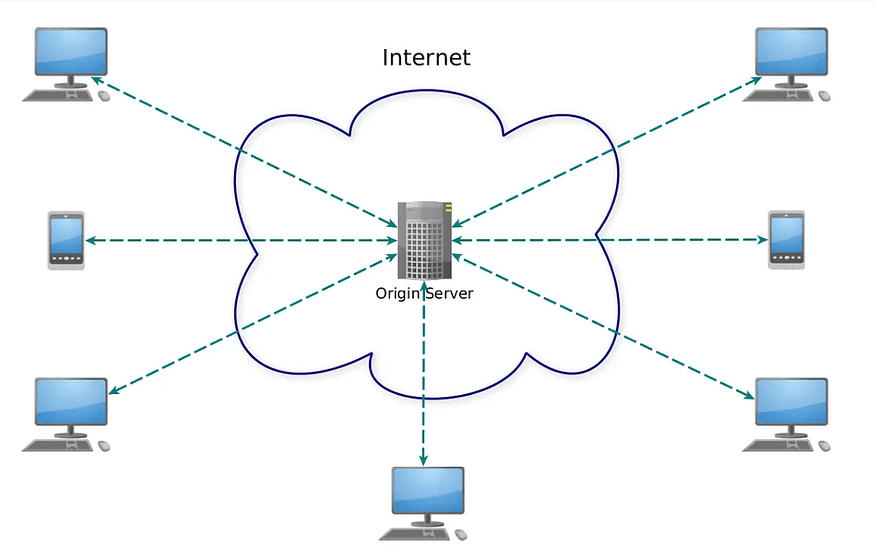
Without CDN
Without a CDN, Internet users connect directly to a website, and the infrastructure supporting the site must be able to support the load generated by users requesting content and deliver it on time with 100% availability.
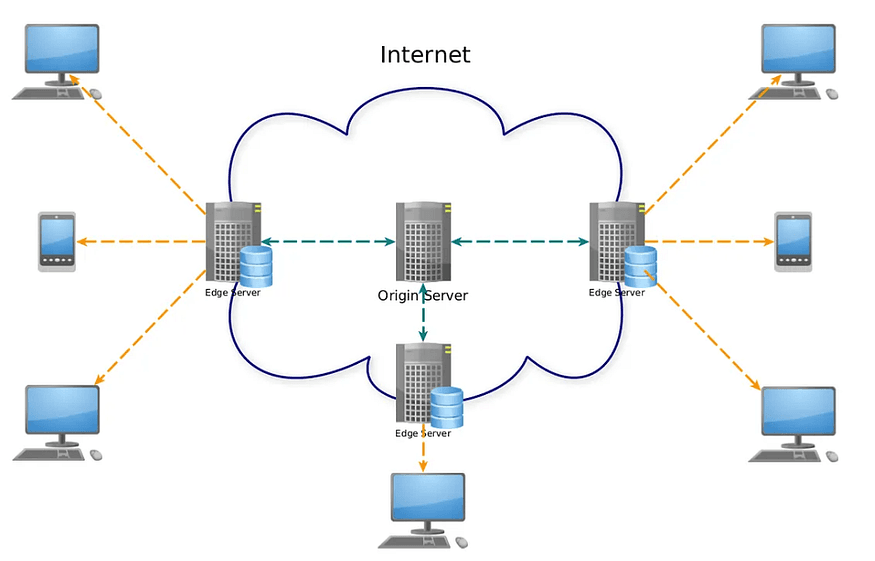
With CDN
1. User Request:
A user tries to access www.example.com/image.jpg.
2.DNS Redirection:
The request is routed to the nearest CDN edge server based on user location, server health, and network conditions.
3. Cache Lookup:
The CDN checks if the requested content is cached locally.
If yes, it serves the content immediately.
If no, it fetches it from the origin server, caches it, and then serves it.
4. Response Delivery:
The content reaches the user from the nearest location — reducing latency and improving performance.
AWS CDN Ecosystem Overview
In AWS, the CDN ecosystem isn’t just CloudFront — it’s an orchestration of multiple services that together make delivery seamless and intelligent:
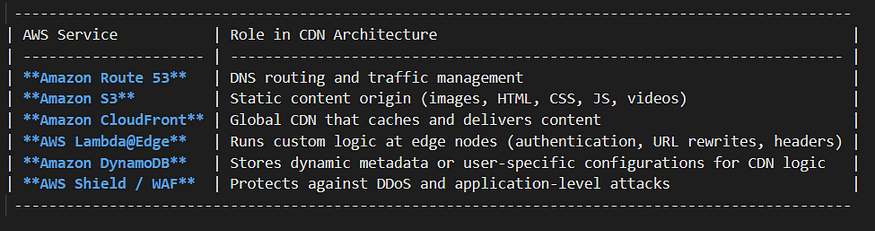
a. Route 53 — Intelligent DNS Routing for CDN:
Amazon Route 53 is AWS’s Domain Name System (DNS) service. It connects user requests to the right AWS resource (like CloudFront or S3).
How Route 53 Works with CloudFront:
When a user types your website (e.g., https://www.mysite.com):
i) Route 53 receives the DNS query.
ii) It checks your configured DNS records.
iii) The record points to your CloudFront distribution (which serves cached content).
iv) Route 53 returns the IP of the closest edge location based on latency-based routing or geolocation policies.
Key Features:
Latency-Based Routing: Sends users to the nearest and fastest AWS region.
Health Checks and Failover: Automatically redirects traffic if one region or CDN origin goes down.
Alias Records: Seamlessly map your custom domain to AWS resources like CloudFront, without needing IP addresses.
Geolocation Routing: Deliver content specific to countries or regions (useful for compliance or localization).
Example Use case:
User → DNS query (Route 53) → CloudFront Distribution → S3 (Origin)
b. S3 — The Perfect Origin for Static Content:
Amazon S3 is the origin server in a CDN architecture. It acts as a cost-efficient origin server for static content like:
Images, CSS, JS files
HTML static pages
Videos and documents
How it works with CloudFront:
You create a bucket in S3 (for example mywebsite-bucket).
You upload files (index.html, style.css ,etc.).
You configure CloudFront to use that bucket as the origin.
CloudFront caches those files in edge locations across the world.
Any updates in S3 automatically propagate to the CDN after cache expiry or invalidation.
Example Use case:
A global news site hosts its media files in S3 → CloudFront caches them globally → Route 53 ensures users reach the nearest edge → reducing latency from seconds to milliseconds.
Securing Your S3 Origin with OAC (Origin Access Control)
When using S3 as an origin, security is just as important as performance. By default, S3 content can be accessed publicly if not configured properly , which can expose your assets or URLs directly to users, bypassing CloudFront.
To prevent this, AWS introduced Origin Access Control (OAC), a modern and more secure mechanism that replaces the older Origin Access Identity (OAI).
With OAC:
You can restrict direct access to your S3 bucket, ensuring that only CloudFront can retrieve content from it.
All user requests must pass through CloudFront, where you can apply caching, access control, and security policies.
The connection between CloudFront and S3 uses signed requests, enforcing authenticated access.
c. DynamoDB — Powering Dynamic CDN Behaviour:
Why is DynamoDB relevant to a CDN setup?
While it doesn’t deliver files like S3, it plays a key supporting role in CDN and global architectures.
Common CDN -related use cases:
Session & Token Management
Store user session data or tokens close to edge locations. CloudFront Lambda@Edge functions can query DynamoDB tables to validate tokens or user sessions before serving content.Dynamic Personalization / A/B Testing
DynamoDB stores configuration or feature flags used at the edge to personalize what content to serve.Cache Metadata Storage
Keep metadata about cached objects — timestamps, cache-control info, or invalidation states.Geo-Replication
Combined with DynamoDB Global Tables, you can replicate data across multiple regions to ensure edge functions get fast access regardless of user location.
So, DynamoDB doesn’t serve content directly — it supports the CDN by storing fast, distributed data near edge servers for intelligent, real-time decisions.
Bringing It All Together: CDN Architecture on AWS
Example: Hosting a Static Website with CDN on AWS
S3 (Origin Server) → You upload your static files (HTML, images, JS).
Acts as your secure and durable origin server.
Using Origin Access Control (OAC), direct public access to the S3 bucket is restricted — ensuring only CloudFront can fetch content from it, enhancing security and access control.
2. CloudFront (CDN) → You create a distribution using your S3 bucket as the origin.
It caches copies of files in edge locations globally.
When a user requests
https://cdn.myapp.com/image.png, CloudFront serves it from the nearest edge.
3. Route 53 (DNS) → Your domain (myapp.com) points to your CloudFront distribution.
Ensures the user’s request is routed to the nearest CloudFront edge.
4. DynamoDB (Optional Layer) → Used by CloudFront functions, Lambda@Edge, or backend APIs to fetch or update session/config data.
For example, when a user accesses personalized content, CloudFront invokes an edge function that checks user info in DynamoDB before deciding what to serve.
OverAll Flow:
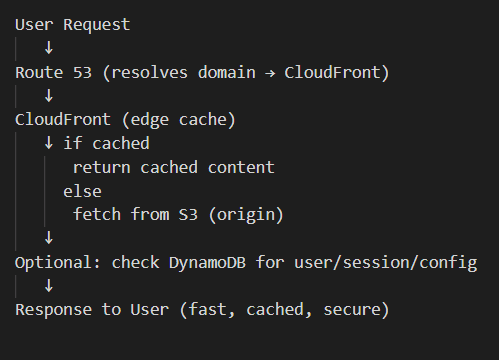
Conclusion:
AWS seamlessly combines Route 53, CloudFront, S3, and DynamoDB to deliver fast, reliable, and scalable content across the globe. Route 53 efficiently routes user requests, CloudFront accelerates delivery through global edge locations, and S3 serves as a secure, durable origin for static assets. DynamoDB adds low-latency data access for dynamic personalization at the edge. Together, these services form a powerful CDN architecture that enhances performance, reduces latency, and ensures a seamless experience for users worldwide.