




General Ticketing Process (GTP) on FlowStax: Building a Scalable, Workflow-Driven Customer Service Application
How GTP uses FlowStax to manage customer issues across classification, routing, resolution, customer verification and closure at scale.
Customer Service · Workflow Automation · FlowStax

GTP is a centralized, workflow-driven ticket management application built on FlowStax to manage customer issues and service requests from creation through resolution and closure.
The Challenge
Managing customer issues at scale is more than simply creating and closing tickets.
A customer issue may be resolved immediately during the initial interaction, while another may require investigation, additional information, coordination across multiple teams, escalation, customer follow-up, and several rounds of action before it can be closed.
The ticketing process therefore needs to provide a single, structured system for managing the complete lifecycle of customer issues.
The application needs to support:
Centralized capture of customer issues and service requests
Structured classification of tickets
Routing to the appropriate team
Controlled escalation and reassignment
SLA monitoring and breach management
Collaboration across multiple teams
Visibility into ticket progress and ownership
Customer verification before final closure where applicable
Role- and state-based access and actions
Operational reporting and monitoring
Integration with customer-feedback services
The underlying requirement is to support both simple issues that can be resolved immediately and complex issues that move across multiple teams, while keeping both within a common ticketing application.
The Solution: GTP on FlowStax
The General Ticketing Process (GTP) was implemented as a configurable application on FlowStax for end-to-end customer issue management.
Rather than creating a separate workflow for every type of issue, GTP uses a common ticket lifecycle with configurable business rules that determine how each ticket should be processed.
At a high level:
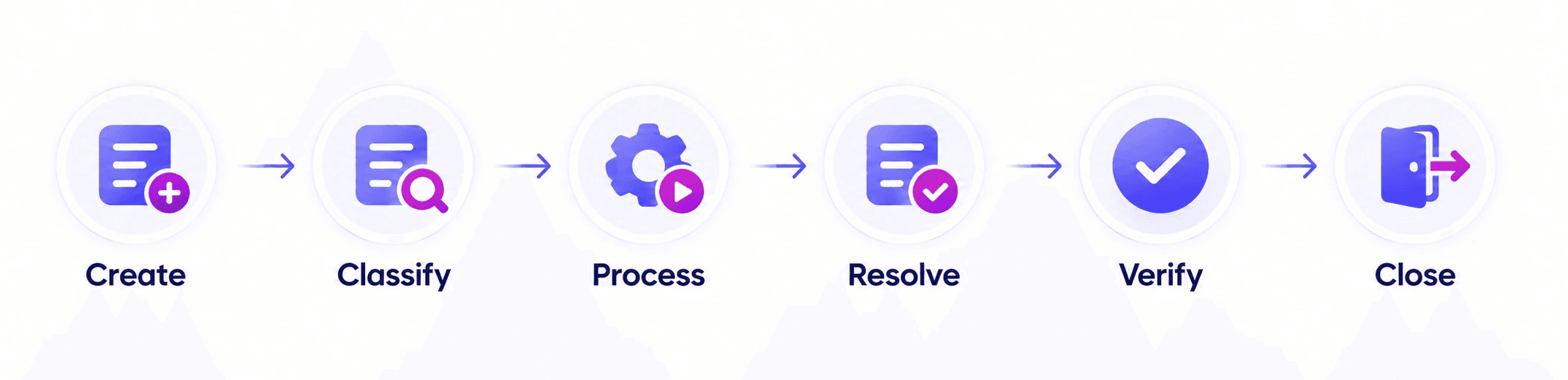
The exact journey depends on the ticket's classification and resolution type. This allows the application to handle a wide range of customer issues while maintaining a consistent operating model.
One Ticket, Two Resolution Paths
A fundamental part of GTP is the distinction between First-Time Resolution (FTR) and Non-First-Time Resolution (NFTR). This allows simple issues to follow a direct path while more complex issues can move through the required teams and workflow stages.
FTR — First-Time Resolution
FTR tickets are resolved at the point of creation and do not need to be assigned to another team.
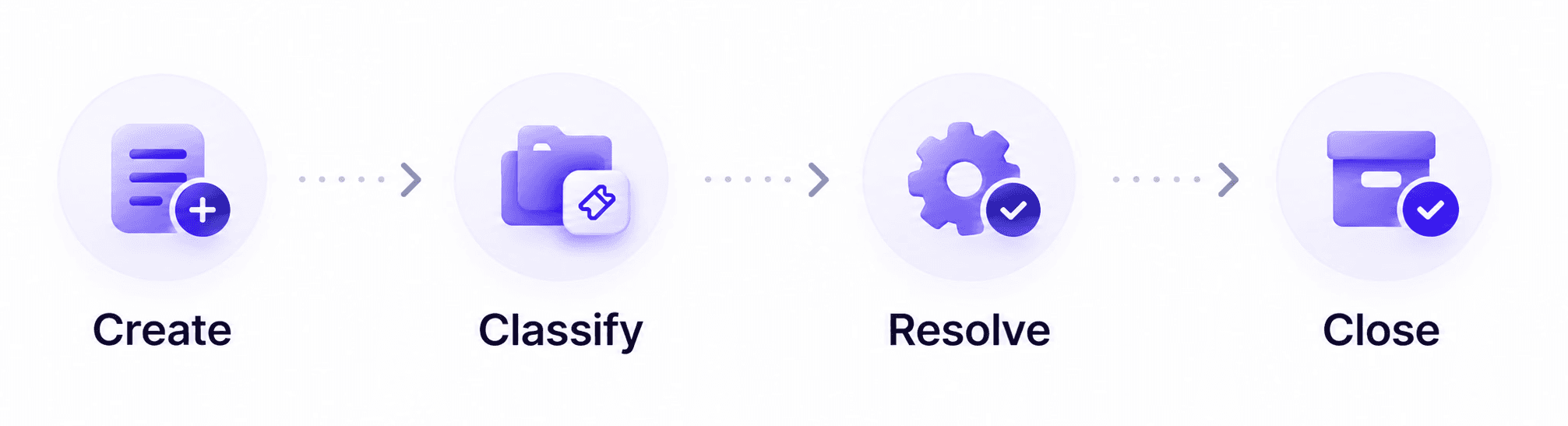
This keeps straightforward customer issues from entering unnecessary downstream processing.
NFTR — Non-First-Time Resolution
NFTR tickets require additional work beyond the initial interaction.
They can be assigned to relevant teams, escalated, rerouted, placed into information-request states, and processed through multiple stages before resolution.
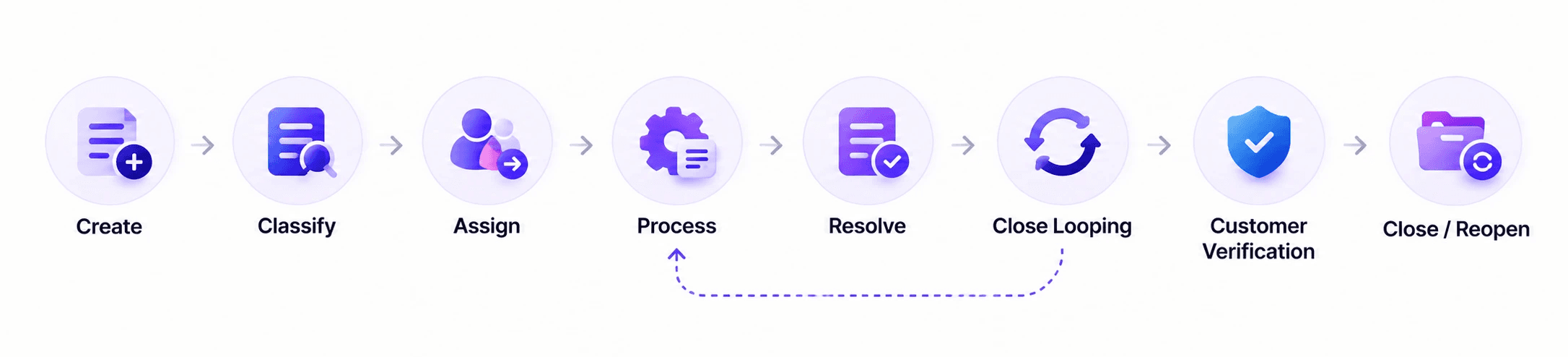
For applicable NFTR tickets, resolution is followed by customer verification. If the customer is not satisfied, the ticket can be reopened and returned to the resolution process.
Structured Classification & Guided Ticket Creation
GTP uses a structured hierarchy to determine what a ticket is and how it should be processed:
Ticket Classification
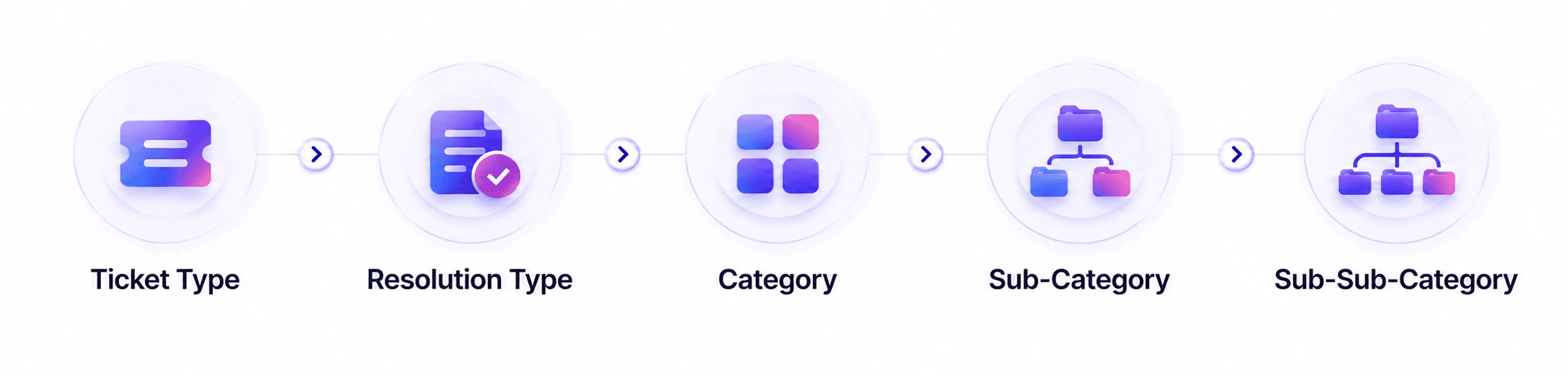
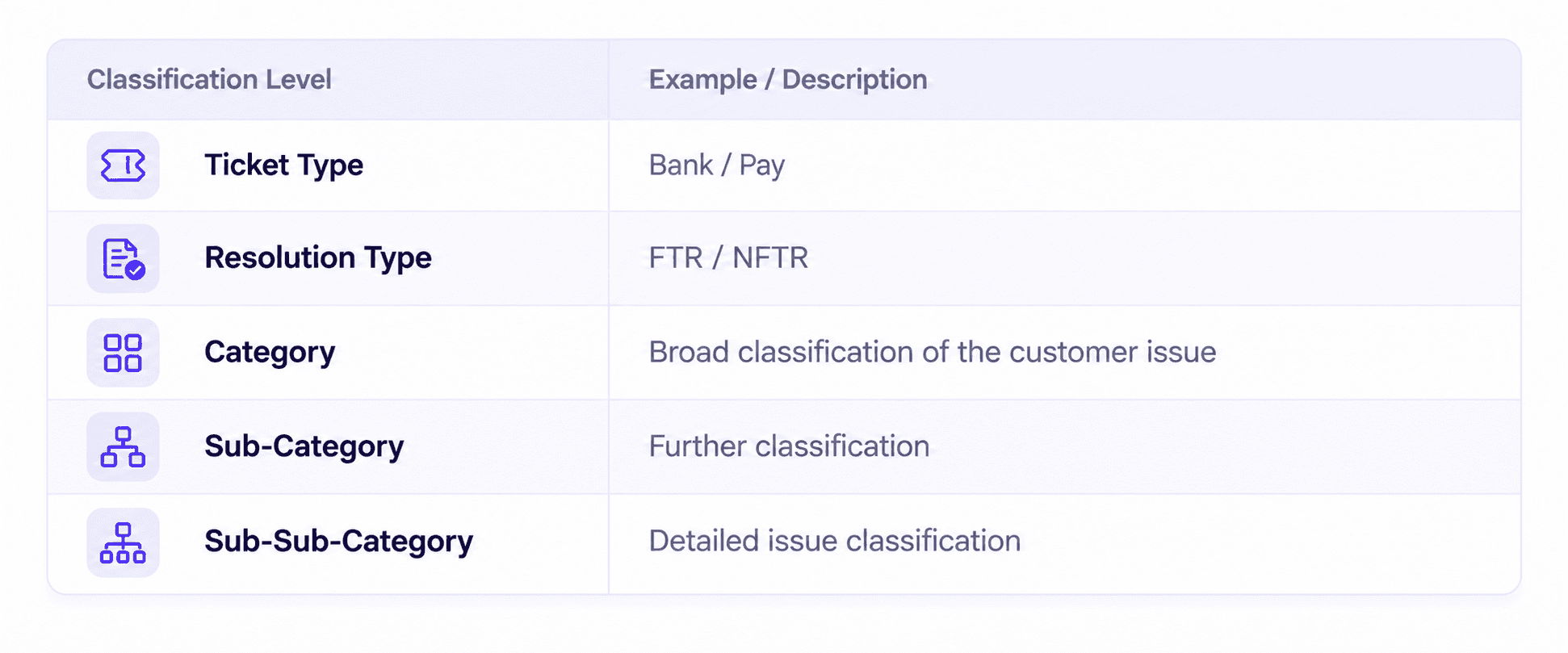
Ticket Classification is arguably the most important step in the process. Ticket classification governs the journey of the ticket through the system. Category > SubCategory > Sub SubCategory narrows the path that the ticket could traverse before it reached the closure. This sub-setting ensures that the ticket is directed to the correct team and is not lost amidst 100s of teams and millions of requests.
Sub-Sub-Category also determines the associated business rules such as:
SLA
Probing Questions
NPS SMS configuration
This means classification is not simply used for reporting. It influences how the ticket behaves throughout its lifecycle.
Guided Ticket Creation
Ticket Classification can not operate in isolation; each combination requires different information to ensure effective downstream work.
GTP uses configurable Probing Questions associated with issue categories. Relevant questions can be presented based on the selected Sub-Sub-Category, with questions configurable as mandatory or optional.
This helps ensure that the information required to process an issue is captured at the beginning rather than being discovered later in the workflow.
Routing, Collaboration & Escalation
Once a ticket has been classified, it needs to reach the right team and remain within a controlled workflow. GTP uses configurable team and escalation information to determine how tickets move through the organization.
The application supports:
Team-based routing
Assignment
Assign to Self
Escalation
Rerouting
Reassignment
Need More Info
Need Attachment
Provide Info
Update Info
Correction cycles
These rules allow tickets to move between teams without relying on informal coordination.
For high-volume work queues, tickets can remain available to an authorized team until a user takes ownership through Assign to Self. The assignment timestamp is recorded for operational and SLA purposes.
Managing Information Dependencies
Customer issues do not always have all the information required for resolution. GTP provides explicit workflow states for these situations.
Need More Info allows a team to request additional information.
Need Attachment moves the ticket into an Awaiting Customer Information state when supporting documentation is required.
Mark for Correction creates a controlled correction cycle when information needs to be corrected.
These states make dependencies visible and keep the ticket within the defined process instead of leaving it in an undefined pending state.
Cross-Team Collaboration
NFTR tickets may involve several teams. Instead of moving the context of the issue outside the ticket, users can collaborate directly through comments or utilize the ticket specific notes section to:
Request information
Provide information
Explain investigation results
Record actions
Clarify requirements
Share relevant context
SLA-Driven Operations
SLA management is integrated into the ticket lifecycle rather than being treated as a separate monitoring activity. Different ticket scenarios can have different resolution timelines, which can be configured through the SLA master.
GTP supports:
SLA configuration
Working Hours
Operational calendars
SLA calculation
SLA notifications
Escalation
SLA monitoring
The system can calculate SLA based on defined operational working periods and calendars rather than simply measuring elapsed calendar time.
When a ticket breaches its configured SLA, the process can notify the appropriate supervisor for intervention.

This gives operational teams visibility into delayed tickets and enables intervention when resolution timelines are exceeded.
Resolution, Customer Verification & Closure
One of the important characteristics of the NFTR process is that resolution and final closure are not necessarily the same step. A processing team can resolve the issue, after which applicable tickets are routed to the appropriate Close Looping team.
Resolution outcomes include:
Resolved with Solution
Resolved with No Service Deliver
Resolved with Customer Info Delay
The Close Looping team can then perform customer verification.
The Close Looping Model
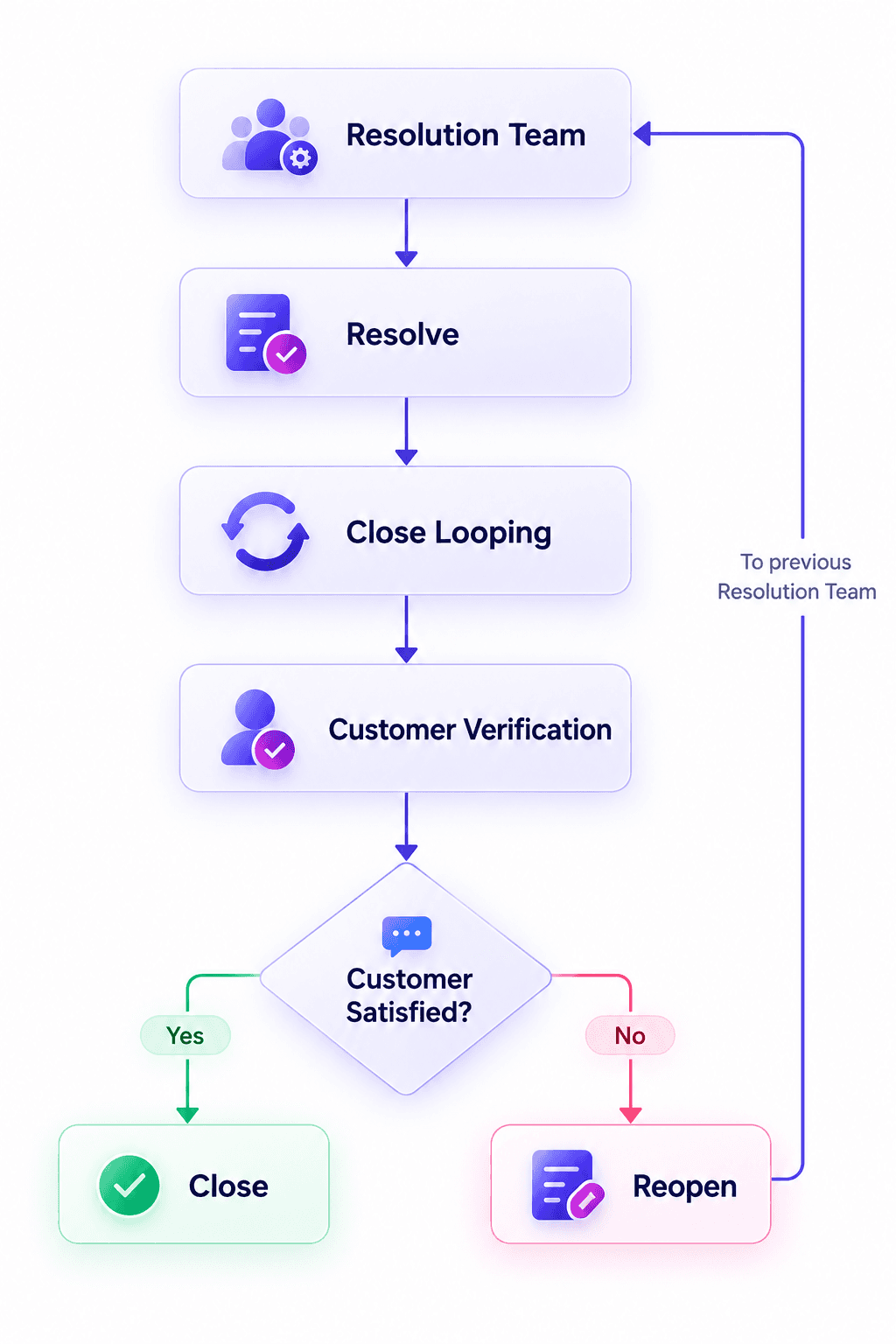
If the customer is satisfied, the ticket can be closed.
If the customer is not satisfied, the ticket can be reopened and routed back into the resolution process.
This creates a feedback loop between issue resolution and customer confirmation, rather than treating an internal resolution as automatically equivalent to final closure.
Controlled Access, Visibility & Traceability
GTP does not give every user unrestricted access to every ticket or action. The available action is determined by a combination of:

Supported actions include assignment, escalation, rerouting, information requests, correction, resolution, reopening, closure and denial.
The application supports different operational roles, including:
Contact Center Agents
Supervisors
Workgroup Agents
Mini Escalation Agents
Close Looping Agents
Administrators
Super Administrators
Each role has defined responsibilities and permissions. For example, agents can process tickets within their responsibilities, supervisors can monitor and reassign work, and Close Looping users manage customer verification and closure.
Ticket Visibility
To enhance ticket visibility and provide ease of access, the application provides default ticket views that logically organize tickets based on their creation and assignment:
All Records – Provides visibility of all tickets available to the user.
Created by Me – Displays tickets created by the user.
Group Created – Displays tickets created by the user's group.
Group Assigned – Displays tickets assigned to the user's group.
Assigned to Me – Displays tickets directly assigned to the user.
These default ticket views provide users with quick access to relevant tickets through logically organized views, reducing the need to manually search through all ticket records.
Tickets can also be searched and filtered using relevant attributes, including Ticket ID and Customer Phone Number.
Complete Audit Trail
GTP maintains a detailed history of ticket activity, including:
Status changes
Actions performed
Comments
Attachments
User
Timestamp
This provides traceability throughout the ticket lifecycle and allows teams to understand what happened, when it happened and who performed the action.
Customer Feedback & Integration
The ticket lifecycle extends beyond internal resolution through integration with customer-feedback services.
GTP integrates with an NPS system and SMS gateway to trigger customer surveys for eligible tickets.
The integration can use information such as:
Ticketing Team
Agent Name
Email ID
Ticket Number
Sub-Sub-Category
Ticket Channel
Ticket Type
Resolution Type
Customer Contact Number
NPS triggering is controlled through configurable rules rather than being automatically sent for every ticket.
The rules can consider:
Ticket team
Sub-Sub-Category
Ticket type
Daily SMS limits
Monthly SMS limits
14-day interval
DND list
Bulk closure
For eligible tickets, the system can generate a unique survey link associated with the ticket and customer. The link is designed for one-time use and expires after 24 hours or submission.
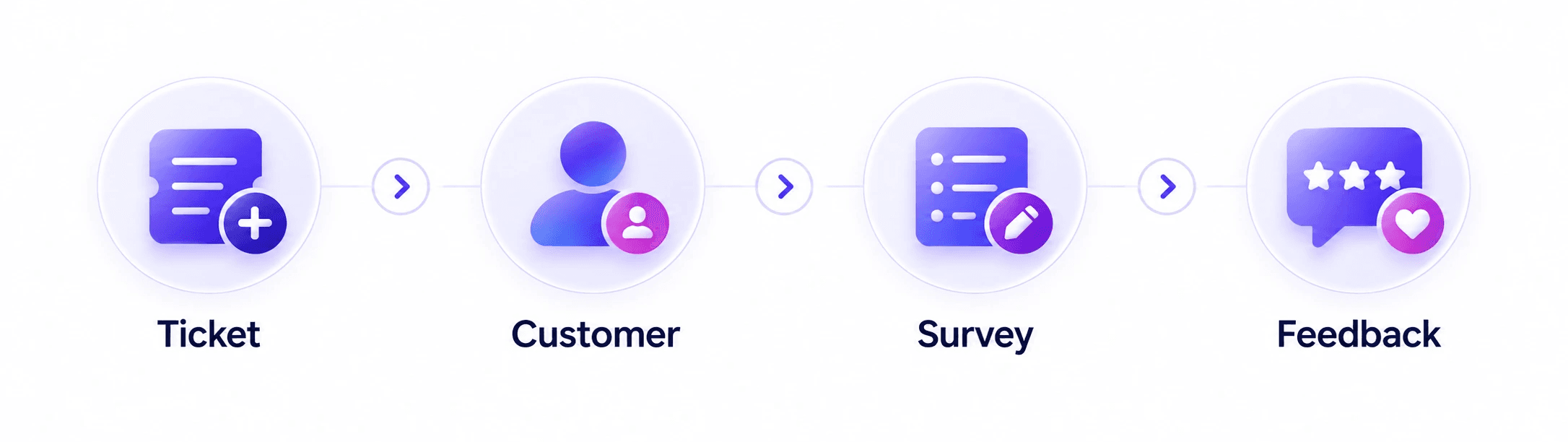
This keeps customer feedback connected to the ticket from which the interaction originated.
Built to Operate at Scale
GTP operates at a scale that goes well beyond a basic ticketing application.
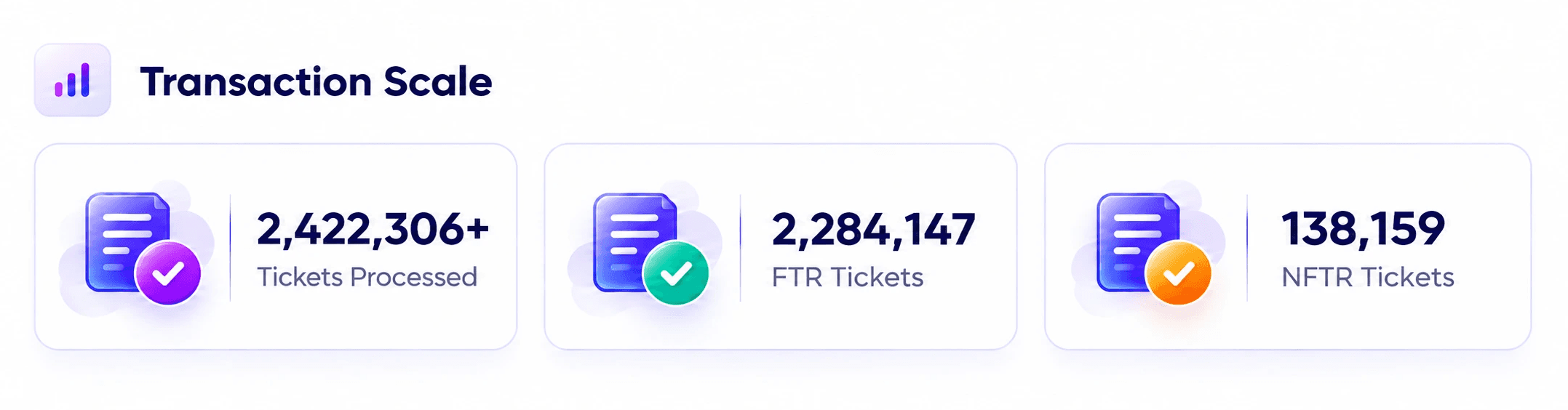
As on September 9,2026.
The application handles approximately:
~11,500 tickets per day
~352,000 tickets per month
and supports 24/7 operations.
Configuration Scale
The application supports:
54 Categories
250 Sub-Categories
2,092 Sub-Sub-Categories
along with:
1,914 FTR scenarios
724 NFTR scenarios
These represent the breadth of configured ticket-processing scenarios supported by the application.
Access Scale
The application also supports:
124 Role Groups
1,376 Role-Group Memberships
1,262 Unique Users
114 Users belonging to multiple groups
The combination of transaction volume, configuration depth and access complexity demonstrates the scale at which GTP operates.
Why FlowStax Was Important
GTP required much more than a basic ticketing interface.
The application had to bring together millions of ticket transactions, multiple resolution paths, complex routing and escalation, role- and state-based actions, SLA rules, customer verification, integrations, auditability and reporting within a single operating model.
FlowStax provided the foundation to achieve this through a configurable, workflow-driven application.
Rather than hardcoding every customer issue as an independent workflow, GTP uses configurable business rules to determine how a ticket behaves based on factors such as Ticket Type, Resolution Type, classification, team, ticket state and user role.
This is particularly important given the breadth of the application: 54 Categories, 250 Sub-Categories, 2,092 Sub-Sub-Categories and 2,638 configured FTR/NFTR scenarios.
FlowStax brings together the capabilities required to operate this model:
Workflow to control the ticket lifecycle
Configuration to maintain classifications, teams, SLAs and business rules
Conditional Logic to determine different processing paths
Role-Based Access to control what users can see and do
Automation for routing, notifications and system-driven transitions
Data Management for tickets and configuration
Audit History for traceability
Integration with external services such as NPS and SMS
Reporting for operational visibility
The importance of FlowStax is therefore not simply that it provides individual features. Its value lies in the ability to combine these capabilities into one configurable application.
This allows GTP to maintain a common ticketing framework while accommodating a large and evolving set of business scenarios.
In other words, the complexity of GTP could be managed through configuration and workflow logic rather than creating a separate custom application for every customer issue scenario.
The Result
GTP provides a structured operating model for managing customer issues from creation through final closure.
The application brings together:
Centralized Tracking
Every customer issue is represented through a defined ticket and lifecycle.
Clear Ownership
Tickets are associated with teams and, where applicable, individual users.
Controlled Processing
Tickets follow defined workflows and permitted actions instead of relying on informal handoffs.
Cross-Team Coordination
Teams can request and provide information directly within the ticket.
SLA Visibility
Delayed tickets can be identified and escalated through SLA monitoring.
Customer-Centric Closure
For applicable NFTR tickets, internal resolution is followed by customer verification.
Complete Traceability
Actions, comments, status changes and other ticket interactions remain associated with the ticket.
Adaptability
Business rules can be maintained through configurable masters rather than requiring every change to become a new application.
Scalability
The application supports millions of ticket transactions, thousands of configured scenarios and more than a thousand users.
GTP at a Glance
The complete model can be summarized as
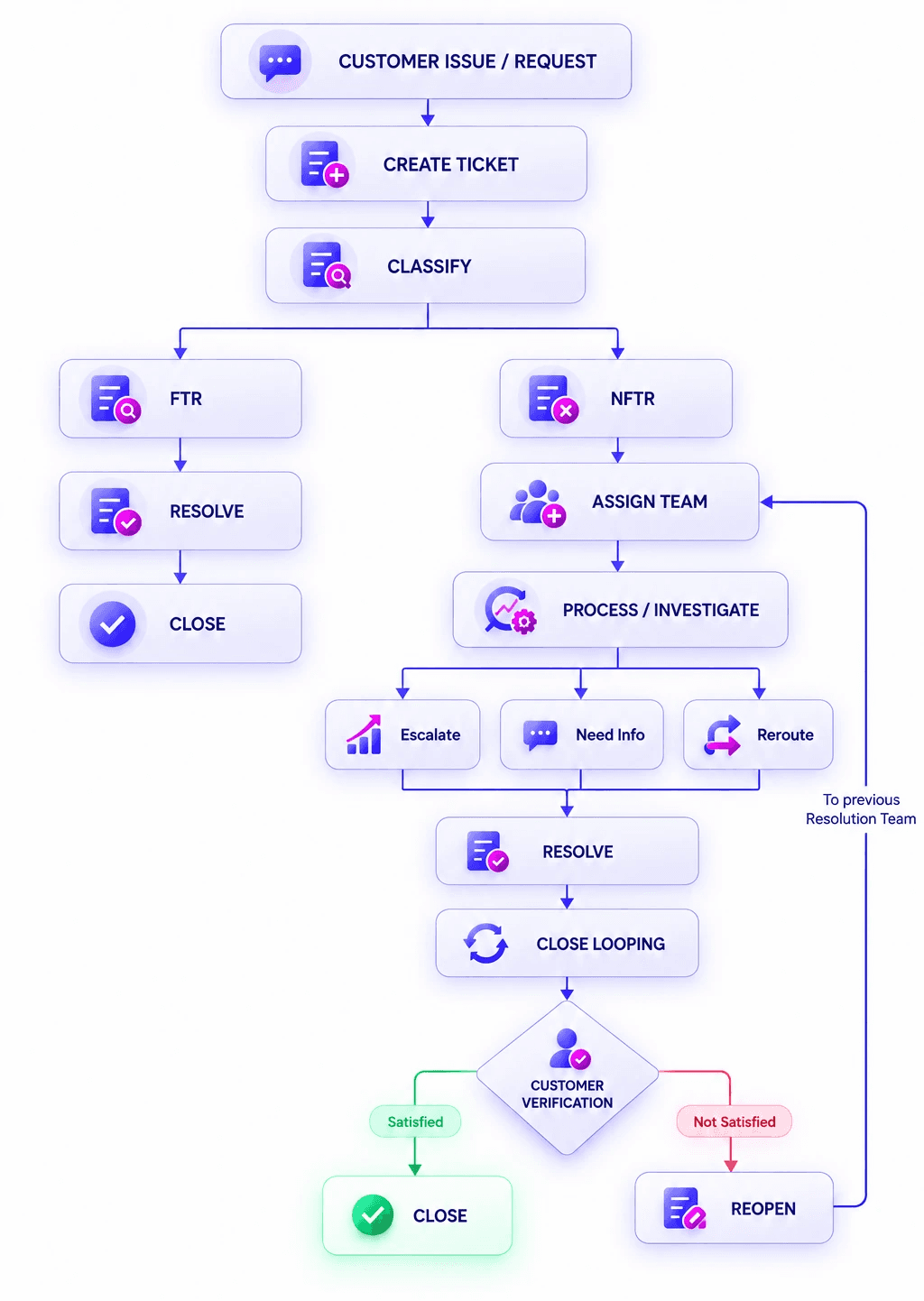
This model allows both simple and complex customer issues to be managed within the same application.
Beyond Ticketing
The General Ticketing Process on FlowStax demonstrates how a configurable workflow platform can support a large-scale customer service application without treating every business scenario as a separate system.
GTP combines:

into one connected lifecycle.
With 2.42M+ tickets processed, approximately 11.5K tickets handled daily, approximately 352K monthly, and 24/7 operational usage, the application demonstrates the scale of the operational environment it supports.
More importantly, it demonstrates how a complex and evolving business process can be structured around a common workflow framework with configurable behavior.
Complex business processes do not always require a separate custom application for every scenario. With the right combination of workflow, configuration, automation, access control and integrations, a single platform can adapt to a large and evolving operational environment.